Gemini and Google Sheets
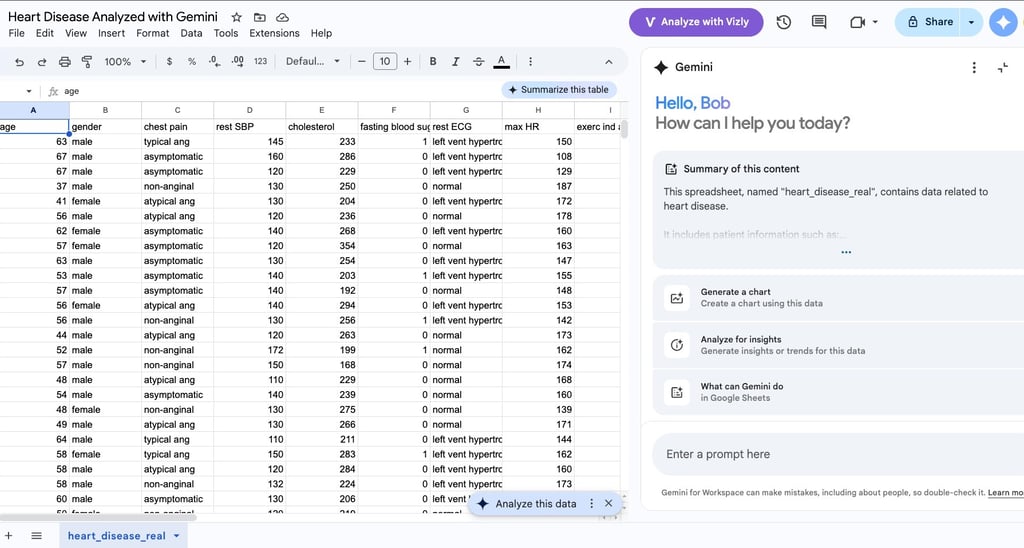
Gemini is now available on Google Sheets if you have a Google subscription to Workspace. Click on the blue Gemini icon in the upper right to open the program. After uploading data, you immediately have two options. Summarize this table and analyze this data. Try both to learn more about your dataset. Please note that this version of Gemini is limited and designed to assist with the Google Sheet. It was not intended for complex data analytics. The Gemini in Google Colab is much better for data analytics. Here are some functions it can run:
Find Trends and Insights: Ask Gemini to spot patterns, outliers, key takeaways, or month-to-month changes using natural language prompts in the side panel.
Generate Formulas: Create complex formulas, cross-table lookups (like XLOOKUP), or multi-action AI functions directly from text prompts.
Build Visualizations: Generate charts, graphs, and visual dashboards automatically based on your dataset.
Use AI Cell Functions: Run inline queries using =AI() or =Gemini() formulas to summarize text, categorize information, or pull real-time web data into specific